
Managing a Google Workspace organization doesn’t always mean giving every administrator full control. As your business grows, different team members may need access to specific settings without having permission to manage everything.
That’s where Google Workspace administrator roles become important.
Instead of assigning complete administrative access to everyone, Google Workspace lets you grant only the permissions someone needs for their job. This improves security, reduces mistakes, and helps your organization follow the principle of least privilege.
In this guide, you’ll learn what administrator roles are, how they work, the most common predefined roles, when to use them, and best practices for assigning administrative permissions in your organization.
Google Workspace allows you to assign different administrator roles based on each person’s responsibilities. This means employees receive only the permissions they need to perform their jobs while keeping your organization’s data and settings secure.
In this guide, you’ll learn how to assign admin roles in Google Workspace, understand the different predefined administrator roles, and follow Google’s recommended security practices. Whether you’re managing a startup, software house, school, NGO, or enterprise in Pakistan, assigning the right administrator role helps you delegate work without giving away unnecessary control.
Administrator roles are permission sets that determine what an administrator can view, manage, or change within your Google Workspace organization.
Rather than giving every administrator unrestricted access, Google Workspace allows you to assign different levels of responsibility based on each person’s role.
For example:
This approach helps organizations maintain better security while allowing staff to perform their daily responsibilities efficiently.
Giving every administrator full access creates unnecessary security risks.
Using administrator roles helps your organization:
For many Pakistani businesses, schools, and NGOs, assigning limited administrator roles is a simple way to strengthen IT security without adding extra complexity.
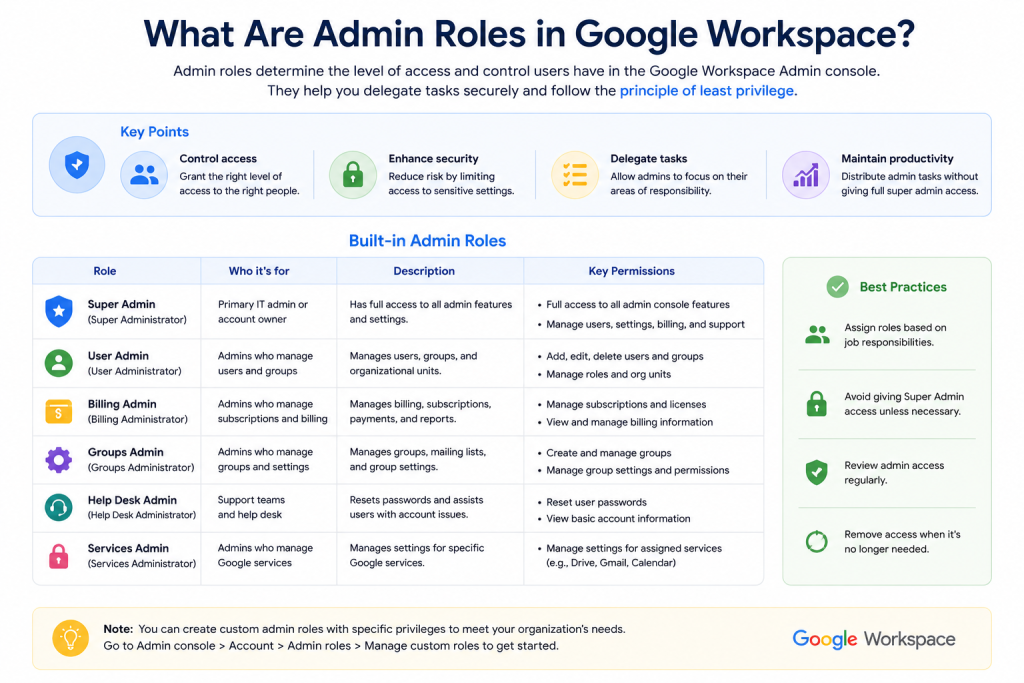
The Super Admin is the highest level of administrator in Google Workspace.
A Super Admin has unrestricted access to nearly every feature and setting within the organization.
Typical responsibilities include:
Because this role has complete control, only a small number of trusted administrators should have Super Admin privileges.
Google Workspace includes several predefined administrator roles for common administrative tasks.
This administrator manages user accounts.
Typical permissions include:
This role is useful for HR departments and IT support teams.
A Groups Admin manages Google Groups across the organization.
They can:
This role is designed for technical support staff.
Typical responsibilities include:
They cannot modify important organization-wide settings.
A Services Admin manages Google Workspace services.
Depending on permissions, they may configure:
A Security Admin focuses on protecting the organization’s environment.
Responsibilities may include:
This role is especially valuable for larger organizations with dedicated security teams.
Billing administrators handle subscription-related tasks.
They can typically:
They cannot manage users unless granted additional permissions.
Sometimes predefined roles don’t match your organization’s needs.
Google Workspace allows Super Admins to create custom administrator roles by combining specific permissions.
For example, you could create a role that allows an administrator to:
while preventing access to:
Custom roles help organizations follow the principle of least privilege by granting only the permissions required for a specific job.
Assigning an administrator role is straightforward.
The basic process is:
The user’s new permissions usually become available within a short time.
When managing administrator access, it’s important to follow good security practices.
Some recommendations include:
These practices reduce security risks and make administration easier as your organization grows.
Many organizations accidentally weaken their security by assigning administrator roles incorrectly.
Avoid these common mistakes:
Regular reviews can help keep administrator access secure and up to date.
Google recommends having more than one Super Admin for business continuity, but only a small number of trusted administrators should have this level of access.
Yes. A user can be assigned multiple administrator roles if their responsibilities require permissions from different roles.
Yes. Google Workspace supports custom administrator roles that combine specific permissions based on your organization's needs.
Administrator roles control what an administrator can manage. They do not automatically change users' files, emails, or documents unless the assigned permissions allow those actions.
No. Most IT staff only need limited administrative permissions. Assigning only the necessary role improves security and reduces the risk of accidental changes.
Generally, no. Administrators can only assign roles if their existing permissions allow them to manage administrator roles. The ability to assign or elevate privileges depends on the permissions already granted to their account.
A Super Admin has complete control over every aspect of Google Workspace, including security, billing, services, and administrator roles.
A User Management Admin focuses on managing user accounts, such as creating users, updating account information, suspending accounts, and restoring users, without receiving full administrative control.
Most predefined administrator roles are available across Google Workspace editions. However, certain advanced administrative capabilities and security features may vary depending on your subscription and the Google services enabled in your organization.
Google Workspace administrator roles make it possible to delegate administrative tasks without giving everyone complete control of your organization. By using predefined or custom roles, you can assign the right permissions to the right people while keeping your environment secure.
Whether you’re managing a small business, school, or growing company in Pakistan, following the principle of least privilege and reviewing administrator access regularly will help protect your Google Workspace environment and simplify day-to-day administration.

As G Suite resellers in Pakistan, we offer great prices on tools that improve communication, enhance teamwork, and provide strong security. Boost your business efficiency with us today!
97-C OPF Society, Khayaban-e-Jinnah Road, Lahore, Pakistan
Copyright © 2025 gworkspacepartner.pk All Rights Reserved.
WhatsApp us