
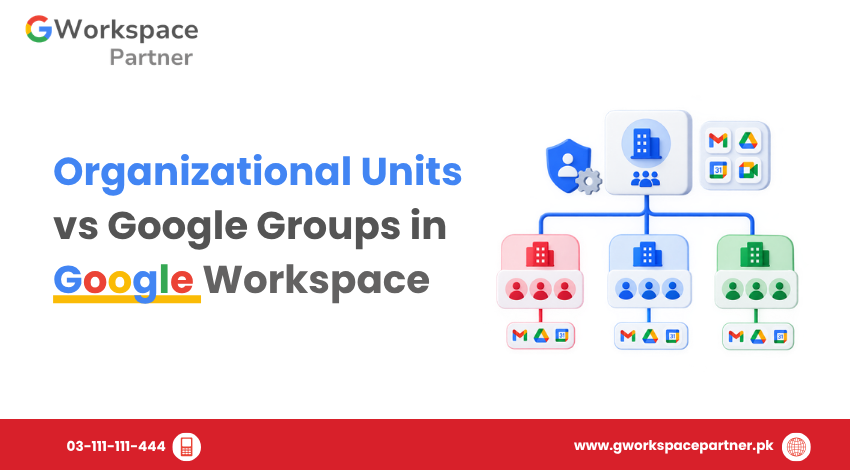
When managing users in Google Workspace, administrators often use both Organizational Units (OUs) and Google Groups. They may appear similar because both can contain multiple users, but they serve different purposes.
An Organizational Unit primarily defines a user’s place in the administrative structure and helps administrators apply supported Google Workspace settings. A Google Group creates a flexible collection of users for communication, collaboration, resource sharing, and, for supported settings, access or configuration.
Understanding the difference helps you build a cleaner Google Workspace user management structure.
An Organizational Unit (OU) is a hierarchical container used to organize users within the Google Admin console.
For example, a company might structure its users like this:
Organizational Units can also contain child OUs, allowing administrators to create a structure that matches the organization’s departments, locations, or other administrative requirements.
The main purpose of an OU is administration and policy management. Administrators can apply supported Google Workspace service settings to an OU, and child OUs can inherit settings from their parent OU or override them where permitted.
An OU is generally appropriate when you need to:
For example, if the Finance department needs different service settings from Sales, you can place Finance users in their own OU and apply the appropriate settings to that OU.
A Google Group is a collection of users who need to communicate, collaborate, share resources, or work together.
For example:
Groups can be used for email distribution, discussions, project teams, collaborative work, and sharing documents with multiple users through a single group address.
Groups also have their own membership and permission controls. Group owners and managers can control who can join, who can see the group, who can post, and who can manage members.
A Group is generally appropriate when:
Unlike an OU, a user can belong to multiple Groups at the same time.
Feature | Organizational Unit | Google Group |
Primary purpose | Administrative organization and policy management | Communication, collaboration, sharing, and flexible membership |
Structure | Hierarchical | Membership-based |
Users can belong to multiple | No — a user has one OU placement | Yes |
Parent/child hierarchy | Yes | Not the same as an OU hierarchy |
Email address | No | Yes |
Email distribution | No | Yes |
Project collaboration | Not its primary purpose | Yes |
Resource sharing | Not its primary purpose | Yes |
Apply supported Workspace settings | Yes | Yes, for supported configuration/access group scenarios |
Best suited for | Departments, roles, locations, administrative structure | Teams, projects, communication, sharing, and selected access/configuration needs |
The simplest way to remember the difference is:
An OU defines where a user sits in your administrative structure. A Group defines which users need to work, communicate, share, or receive access together.
Use an OU when the requirement is tied to the user’s organizational position.
For example:
“Everyone in Finance should have this Google Workspace configuration.”
A Finance OU makes sense because the users share a stable organizational relationship.
A structure could look like:
Company
If the company later changes a supported service setting for Finance, the administrator can apply it to the Finance OU instead of changing individual users. Google Workspace supports inherited settings and OU-level overrides for supported services.
Use a Group when membership is based on a relationship, project, communication need, or resource requirement rather than a user’s position in the organization.
For example, suppose a company has employees from Finance, IT, and Sales working on a new customer project.
Creating a new OU would not be necessary because these employees still belong to their existing departments.
Instead, the company could create:
The Group could then be used for:
This is one of the main advantages of Groups: membership can cut across the organization’s departmental structure.
Yes, but this requires an important distinction.
Google Workspace supports configuration groups or access groups for certain settings. This allows administrators to target supported settings to specific users through a Group instead of changing their organizational unit.
For example, a company might have users spread across several departments but want only selected employees to receive access to a particular service.
Instead of restructuring the OUs, an administrator may be able to create an appropriate access or configuration group and apply the supported setting to that group. Google documents this option for certain service and sharing settings.
However, not every Google Workspace setting supports group-based configuration.
This means you should not assume that a Group can replace an OU for all administrative policies.
For settings that support configuration groups, Google states that group settings can override organizational-unit settings. The exact behavior depends on the setting being configured.
Consider an employee who belongs to:
OU: /Sales
and also belongs to:
The user remains part of the Sales OU, but a supported setting can potentially be targeted through the configuration group without moving the user to another OU.
This is useful when the required policy does not match the organization’s normal departmental structure.
You do not have to choose between OUs and Groups.
In many Google Workspace environments, they work together.
For example:
Organizational Units
Google Groups
An employee could therefore be:
OU: /Finance
Groups:
The OU represents the employee’s administrative placement, while the Groups represent different communication, collaboration, sharing, or access relationships.
This is why Groups should not normally be used to recreate the entire organizational hierarchy.
Consider a software company in Lahore with 80 employees.
Its administrative structure could be:
Organizational Units
The company then starts a new client project involving:
These employees still belong to their normal departments, so creating a new OU for the project would add unnecessary complexity.
Instead, the company could create:
The Group could be used for project communication, Drive sharing, Calendar invitations, and other supported collaboration or access requirements.
If the project ends, the company can manage the Group membership without changing the users’ organizational placement.
Groups are flexible, but they do not replace the hierarchical organizational structure used for Google Workspace administration.
Use OUs when the requirement is based on organizational structure and supported administrative settings.
A temporary project involving people from multiple departments usually does not require a new OU.
A Group is often more appropriate when membership changes independently of departmental structure.
Group-based configuration is available only for supported Google Workspace settings.
Where a setting supports configuration groups, group-based settings can take precedence over OU settings. This should not be treated as a universal rule for every Google Workspace service or policy.
If a file is shared directly with a Group, removing a user from that Group can remove their group-based access. However, the user could still have access through another Group, direct sharing, or another permission path.
Always check the actual permission structure before assuming that removing someone from one Group completely removes their access.
Ask what you are trying to represent.
The user’s department and collaboration requirements are different.
For example:
OU: /Finance
Groups:
This structure allows the company to maintain a clear administrative hierarchy while keeping collaboration and access flexible.
No. An Organizational Unit is part of the Google Workspace administrative hierarchy. A Google Group is a membership-based collection used for communication, collaboration, sharing, and supported access or configuration scenarios.
Yes. A user can belong to multiple Groups for different departments, projects, communication lists, or access requirements.
Yes. In fact, this is a normal Google Workspace setup. The user has an organizational-unit placement while also belonging to one or more Groups.
No. Groups provide flexible membership and can support certain access and configuration requirements, but they do not replace the hierarchical organizational structure provided by OUs.
For supported settings, administrators can use access or configuration groups to target settings to selected users. However, group-based configuration is not available for every Google Workspace setting.
If the department represents an administrative structure and requires different Google Workspace settings, an OU may be appropriate.
If the department mainly needs a mailing list, collaboration space, or shared resources, a Group may be sufficient.
In some organizations, the same department can appropriately have both an OU and a Group.
Organizational Units and Google Groups serve different roles in Google Workspace.
Use Organizational Units to represent your administrative structure and apply supported settings to users based on that structure.
Use Google Groups for flexible membership, communication, collaboration, resource sharing, and supported access or configuration requirements.
The two are not competing systems. A well-structured Google Workspace environment often uses both:
OUs provide the administrative structure; Groups provide flexible membership and collaboration.

As G Suite resellers in Pakistan, we offer great prices on tools that improve communication, enhance teamwork, and provide strong security. Boost your business efficiency with us today!
97-C OPF Society, Khayaban-e-Jinnah Road, Lahore, Pakistan
Copyright © 2025 gworkspacepartner.pk All Rights Reserved.
WhatsApp us