

Apply for Google Workspace for Education (Pakistan Guide)

How to Apply for Google Workspace for Education

Schools and colleges in Pakistan are increasingly shifting toward digital systems for managing classes, assignments, and communication. One of the most commonly used platforms for this purpose is Google Workspace for Education.

This guide explains the actual application process, what happens during approval, and what schools should realistically expect. It is not a promotional overview—this is the practical flow used by real institutions.
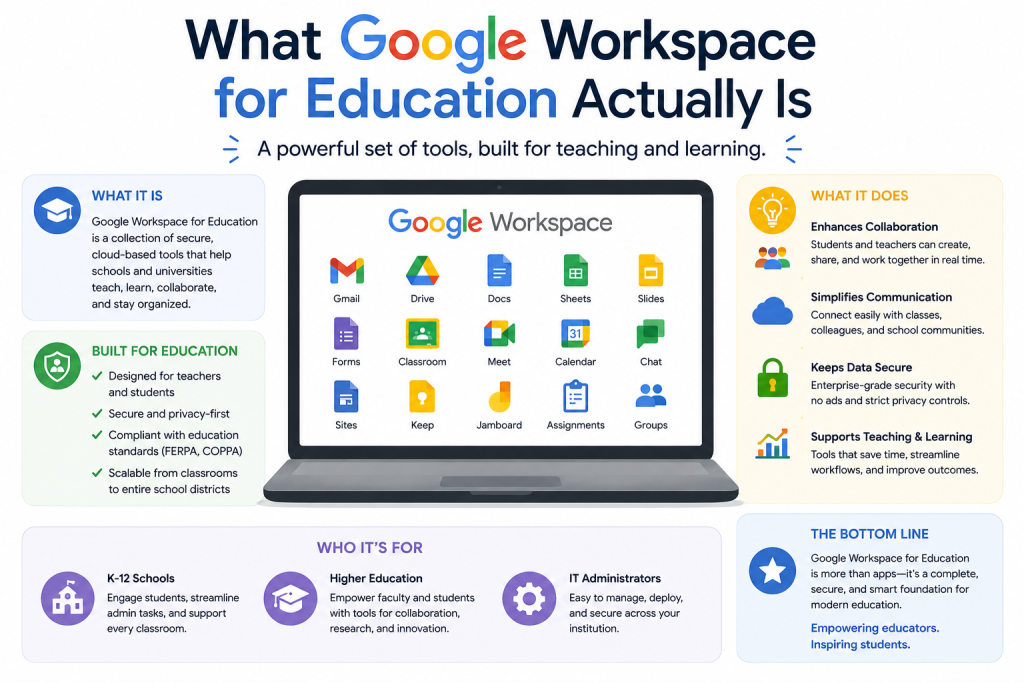
What Google Workspace for Education Actually Is

What Google Workspace for Education Actually Is

Google Workspace for Education is a system provided by Google for verified educational institutions. It allows schools to create managed accounts for teachers and students under one domain.

It typically includes tools like:

  • Gmail for official communication
  • Google Drive for file storage and sharing
  • Google Meet for online classes
  • Google Calendar for scheduling

The key point is not the tools themselves, but the centralized admin control for schools.

Before You Apply: Basic Requirements

Before starting the application, schools should be clear about eligibility. Google does not approve individual users or informal setups.

Your institution generally needs:

  • A registered school, college, or academy
  • A verified domain (example: schoolname.com)
  • An official admin contact person
  • Basic organizational information (student/staff size, contact details)

If a school does not have a domain, the application cannot proceed.

Step-by-Step: How the Application Actually Works

This is the real process most institutions go through.

Step 1: Start the Signup Process

The school begins by selecting the Education version on Google’s signup page.

During this step:

  • Institution details are entered
  • Basic profile information is submitted
  • Country and organization type are selected

At this stage, nothing is approved yet.

Step 2: Domain Verification (Most Important Step)

Google requires proof that the school owns the domain.

This is done by:

  • Adding a TXT record in DNS settings
  • Or verifying through the domain provider panel

If this step is not done correctly, the application cannot move forward.

This is where many schools face delays due to lack of technical setup.

Step 3: Admin Console Setup

Once domain ownership is verified, the school gets access to the Admin Console.

From here, administrators can:

  • Create user accounts (students and teachers)
  • Manage permissions and access levels
  • Enable or disable services like Gmail and Drive
  • Set security policies

However, at this point, full access may still depend on approval status.

Step 4: Google Review and Eligibility Check

This is the most misunderstood stage.

Google may review:

  • Whether the institution is a valid educational organization
  • Whether submitted details match domain ownership
  • Whether the application meets eligibility rules

Important reality:

  • Approval is not always instant
  • Some applications are reviewed manually
  • Additional documentation may be requested

There is no fixed approval timeline.

Step 5: Final Activation

Once approved, the institution can fully use the system.

At this stage:

  • Student and staff accounts become active
  • Services like Gmail, Drive, and Meet are fully enabled
  • Admin controls become fully functional

If rejected, schools may need to reapply or correct documentation.

What Schools in Pakistan Usually Face During Setup

In real-world cases, schools in Pakistan often face practical issues such as:

  • DNS record setup confusion
  • Domain not properly verified
  • Delayed approval from Google
  • Lack of internal IT support
  • Misconfigured admin settings

These issues are not platform problems—they are setup and process challenges.

Common Mistakes to Avoid

Many applications are delayed due to simple mistakes:

  • Using a personal email instead of institutional domain
  • Incorrect DNS configuration
  • Missing or incomplete school details
  • Submitting inconsistent information
  • Not assigning a proper admin user

Fixing these early reduces approval delays.

How Schools Actually Use It After Approval

Once the system is active, schools typically use it in a structured way:

  • Teachers conduct classes through Google Meet
  • Students submit assignments using Google Drive
  • Official communication happens through Gmail accounts
  • Exams and schedules are organized using Google Calendar

Everything is controlled through the admin system instead of scattered apps.

Role of External Setup Support (Practical Reality)

Many schools do not handle technical setup internally. This is common, especially during domain configuration and admin setup.

In such cases, support providers like gworkspacepartner.pk (a Google Workspace partner under CreativeON.com) are often used for:

  • Domain verification assistance
  • Admin console configuration
  • Account setup for staff and students
  • Migration from existing systems
  • Initial deployment support

This is not mandatory, but commonly used when schools lack technical staff.

Summary

  • Google Workspace for Education requires a verified educational institution and domain
  • Domain verification is the most critical step
  • Google may manually review applications before approval
  • Setup delays are usually caused by technical configuration issues
  • After approval, schools get centralized control over communication and learning tools

This is a structured application process, not an instant activation system. Schools that prepare properly usually experience fewer delays and smoother onboarding.

AF

Asher Feroze
Author | CreativeON Team
I’ve worked in various roles at CreativeON, including Manager Operations, Manager Marketing, and Level 2 Client Support. These days, I focus on helping people like you understand our products — whether it’s Domains, Dedicated Servers, VPS, Cloud Hosting, or Google Workspace — in simple, practical language.
Making Tech Simple for Businesses